|
|
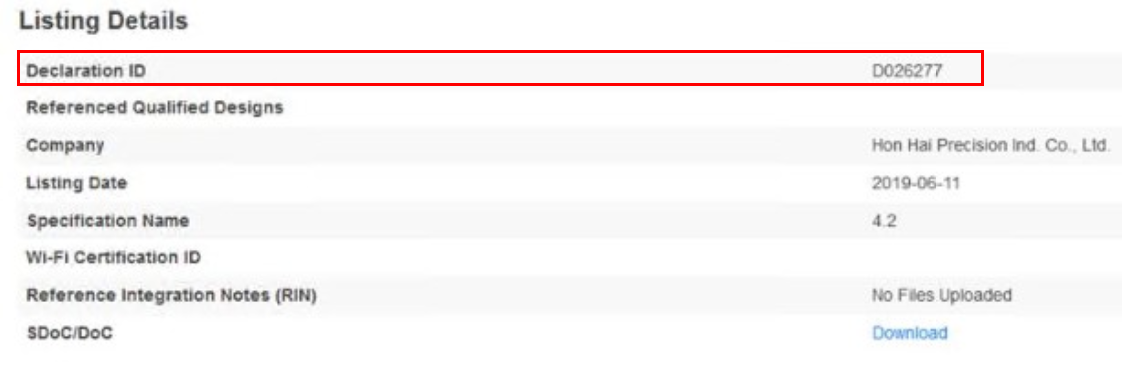
Hi SB, The HDMI/HDCP certification is almost complete. Shanghai Simplay Lab. just finish the pre-test for all the test items today. The certification report and certificate should be able to released by HDMI org. by 6/24 |
|
|
Hi Catherine, Please update BQB certification status to ALT SB. |
|
|
Hi SB BQB certification had been qualified, and also listed under in Bluetooth Association thanks |
|
|
Hi Catherine and Sean please update BQB certificaiton sheet. and test report |
|
2019-06-19 11:50 developer |
|
|
|
Hi SB, 1. update test report as attached file 2. BQB is not certification sheet, it can only be queried through SIG website because publish date on 6/30, currently unable to query at SIG website |
|
|
Hi Catherine please let me know below 1. add link SIG Website 2. let me know that searching method. ALT does not join SIG. |
|
|
Hi SB, 1. If you want to search, you can link the following address, but it will be opened searching on 6/30 you don't join SIG member and can search SIG link : https://launchstudio.bluetooth.com/Listings/Search 2. You can search through "QDID", as attached capture screen that BFX-AT100/BFX-UH200 had been logged in SIG thank you BFX-AT100_BFX-UH200 BQB certification.png (135,693 bytes) |
|
|
Hi Mr. Yoon, 1. BQB: Catherine already upload BQB test report on 6/19. Please check hers comments. 2. HDMI/HDCP: Please refer to the attached file as HDMI/HDCP certification document. 3. Dolby: Please refer to the attached file as Dolby certification document. |
|
|
Hi SB, sorry to upload the wrong model HDMI certification. Please find the attached file for HDMI/HDCP certification document for Eagle. Thank you. |
|
|
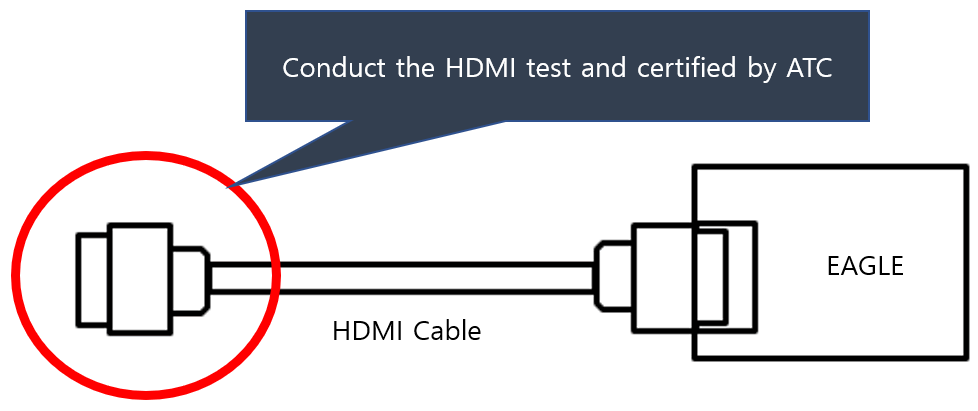
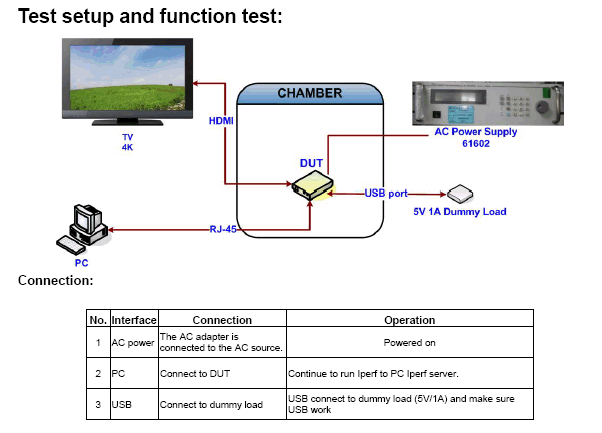
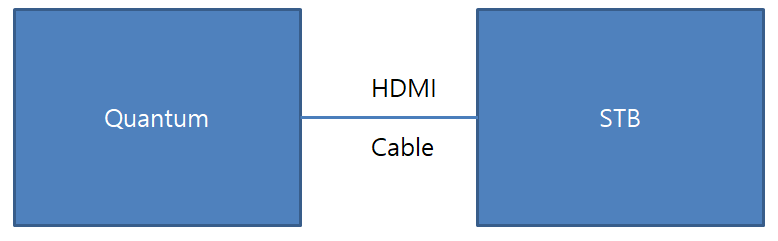
Hi Sean, Henry. I have a question of HDMI ATC certification. I already submit SKB to HDMI ATC certification approval sheets. (both Eagle and HDMI cable) SKB manager request to another ATC Certification of HDMI. 1. Test block diagram (see below picture) Connect HDMI cable to Eagle Then, Conduct HDMI characteristic and Certified by ATC 2. SKB manager said to me, Eagle and It’s HDMI cable of each are already passed ATC certi. But a few compatibility issue appears in field (customer’s area) So they want to check that there is no problem while Ealge is connected to HDMI cable. 3. Please check the below : 1) Can you proceed with the ALT certification ATL? 2) If possible, please let me know how long take the time to receive the final report and the cost. eagleandhdmicable.gif (17,349 bytes) |
|
|
Hi SB, 1) We can do the HDMI certification based on the setup requested by SKB. 2) It needs 4weeks to perform the test and 1 weeks to process the report & certificate. For the cost information, Henry will deal with it and reply you directly. |
|
|
Hi Sean. Thank you so much. |
|
|
Hi SB, Can you describe in more detail for what HDMI compatibility issues found in field? I'm just afraid that to certified again the box with HDMI cable may not to fix the problem. |
|
|
Hi Sean I also don't take a detail symptom from field. There are many RMA samples that the symptom is just described "Display fail". As I was checking these samples, most of them are normal. So SKB request to certify ATC with their own test setup. |
|
|
Hi SB, I would suggest that we should try to reproduce this problem before we can confirm whether this issue is related to compatibility of the OTT & the HDMI cable. Based on our experience in the past, most of the display fail may caused by TV compatibility issue. Can SKB or ALT confirmed the "Display fail" symptom is not related to TV? |
|
|
Hi Sean. It is very difficult to confirm "Display fail" symptom is not related to TV directly. because there is no test at field customer's side. first I will submit SKB to information of ATC test and cost. then SKB manager will give us to next plan. Hi Henry thank you for the information of ATC cost. could you please reply to mail or update at Mantis? |
|
|
Hi SB, OK, please let us know if there is any further request from SKB. Thanks. |
|
|
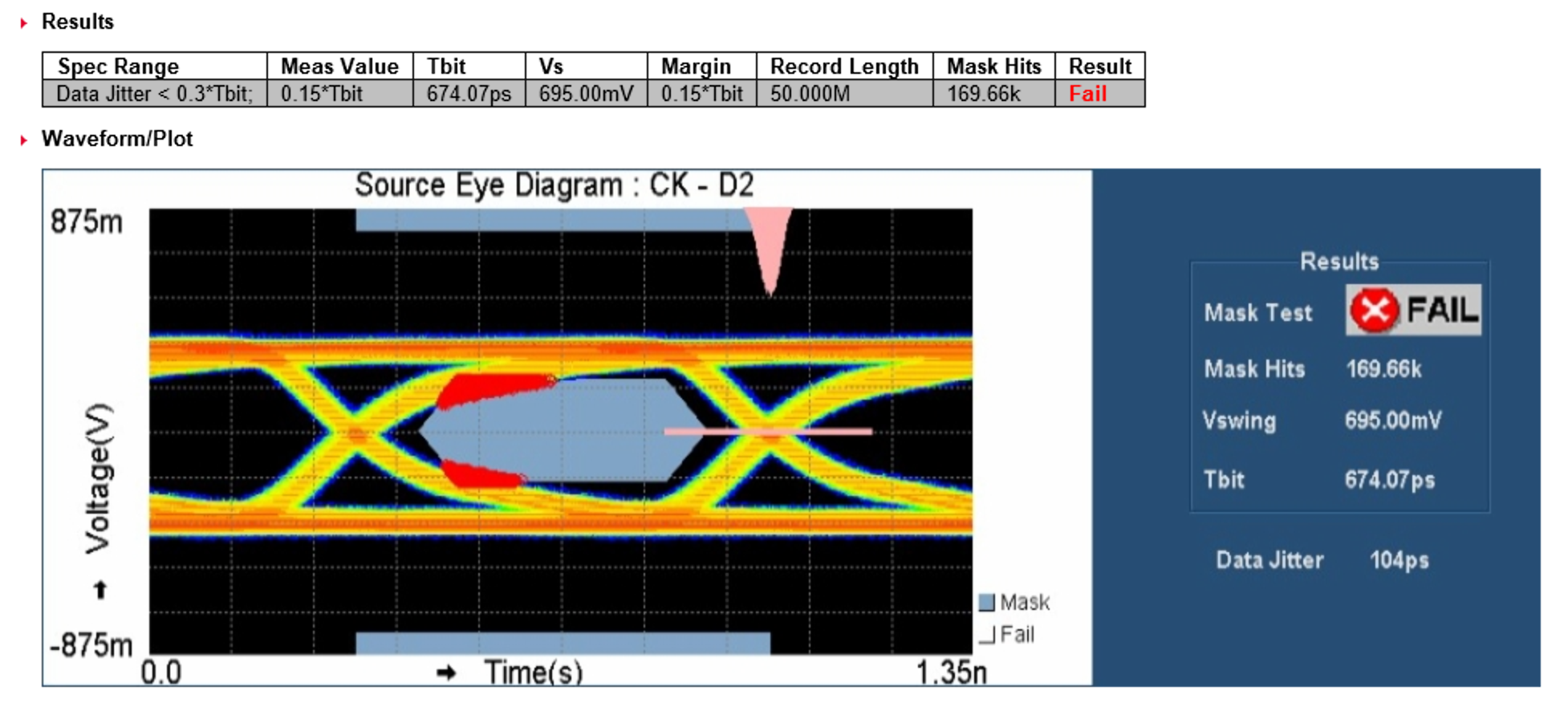
Hi Sean. SKB manager gave me the HDMI compliance test report of Eagle. and the eye diagram is fail. (please see the attatched file.) They conduct the HDMI test to Eagle's HDMI cable port (see above the photo) 1. Is there any solution of eye diagram's failure? 2. How much setup drive strength of Eagle's HDMI signal (the swing level) 3. what is the control factor of drive strength for improving the eye diagram. 4. Can you conduct the HDMI compliance test in your office? (Do you have a test equipment?) if yes, please conduct the 1080p/60Hz of HDMI complience test (the test point is not Eagle's HDMI port but HDMI cable's port.) |
|
|
Hi SB, Please see my comment as below, 1. Is there any solution of eye diagram's failure? ==> It should be able to fine tune the registers of swing or amplitude for HDMI data pin. 2. How much setup drive strength of Eagle's HDMI signal (the swing level) 3. what is the control factor of drive strength for improving the eye diagram. ==> We need to work with our SW team & Amlogic for the corresponding register and the current value 4. Can you conduct the HDMI compliance test in your office? (Do you have a test equipment?) if yes, please conduct the 1080p/60Hz of HDMI complience test (the test point is not Eagle's HDMI port but HDMI cable's port.) ==> We can do the HDMI compliance in our HWQA Lab. but the testing probe was broken for a while. We have to borrowed the probes from equipment vendor. So, we will inform you the date for testing. Also, we have to check with QA team if we have particular fixture to conduct this kind of testing. |
|
|
Hi Jay, Please follow up with this issue. |
|
|
We talked about HDMI compliance test. And I share to you some agenda. ( I also update at mantis 730) 1. Change swing level of HDMI TMDS signals. - Issue : Eye diagram fail. D0-CLK, D1-CKL, D2-CLK at 1080p/60Hz Test point : the end port of HDMI Cable (test condition : HDMI cable + Eagle board. See the above picture) - Solution : change the swing level - Side effect : EMI failure may occur. 2. I discussed with SKB manager about changing HDMI swing level. SKB manager don’t want to change swing level because of side effect (EMI) But, He still want to know : 1) How much setup drive strength of Eagle’s HDMI signal (Swing level) 2) What is the control factor of drive strength for improving the eye diagram. 3) Please conduct HDMI Compliance test (@1080p/60Hz) If you cannot conduct immediately, please let me know the test schedule. I should submit SKB manager to test result or schedule until next meeting. 3. If ATL may pay for this HDMI compliance test, please let me know this information ( Henry please ) |
|
|
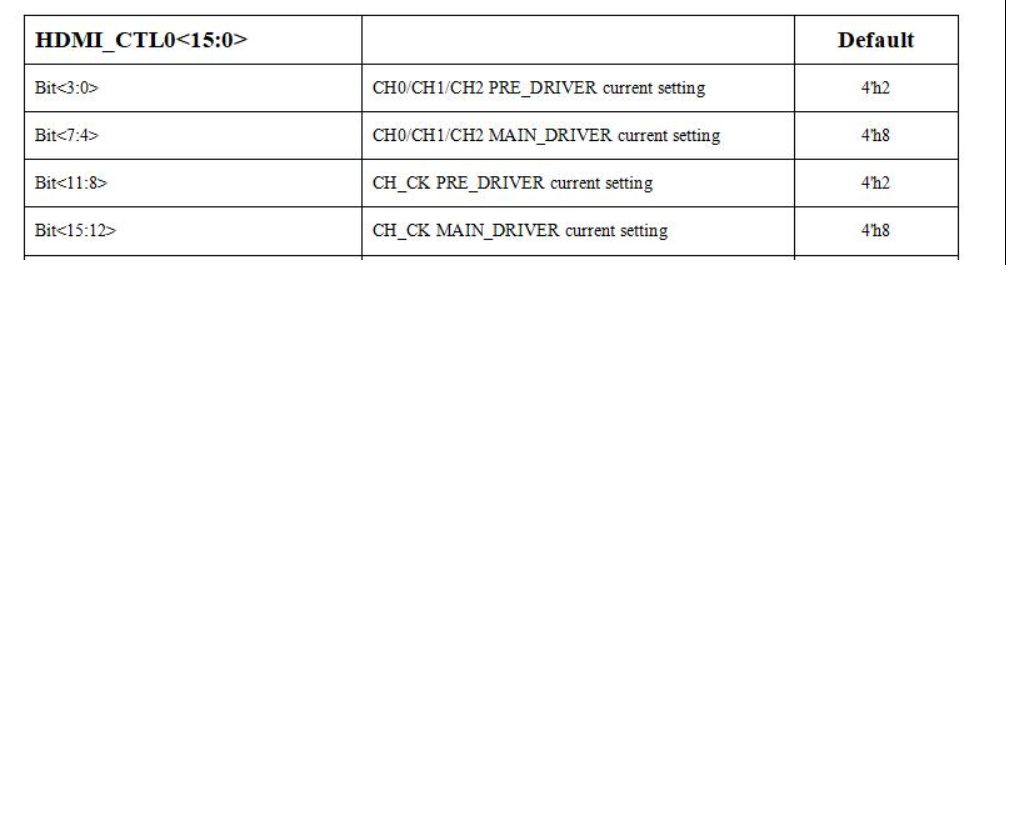
Hi Henry, Sean I discussed with SKB manager. and I update meeting agenda at mantis. 1. please hold to conduct HDMI compliance test in your office. 2. SKB manager want to have more informations of HDMI Swing levels. (please see the picture and add the information of table) 3. please give me the datasheet of this register (you don't need to give me the total datasheet. you can give me to captured "0xFF63C3A0" part HDMI_regitster_value.gif (13,789 bytes) |
|
|
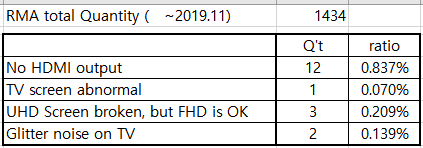
Hi Henry, Sean I update about the HDMI field issue. 1. the period is from 1st to 2019.11 (we didnot classify yet since 2019.dec) 2. please see the below table of HDMI issue and ratio 3. these issues are reproduced 100% (so I guess these issues may not be compatibility defect) 4. I cannot count a quantity which occured the hdmi defect in field but NDF in my office. HDMI_Defect_ratio.gif (5,762 bytes) |
|
|
Hi SB, The register is HEX, so the min is 0, max is F . Please note when you change the swing, it will affect the EMI. Please refer detailed discription of register as attached. HDMI register.png (148,728 bytes) |
|
|
Hi Sean Thank you for your support. but, could you please update at my table? and is there any datasheet of "0xFF63C3A0" part? |
|
|
Hi Sean I update the original file of above table |
|
|
Hi SB, Since you said these defects are 100% reproducible...plz follow the agreed RMA process. We will work with factory to analyze the defect. Also as previously mentioned HDMI cables, plz arrange the shipment to the factory as well. |
|
|
Hi SB, Update file as attached. And also please check the full version datasheet of register as attached. |
|
|
Please find register datasheet as attached. |
|
|
Hi Henry thank you for updating datasheet. but, I cannot find your captured picture(HDMI register) in datasheet check please |
|
|
Hi SB, According to Amlogic, they don't provide the detailed value in datasheet. The HDMI register table I provided yesterday is established by Amlogic RD. |
|
|
Hi Sean. Please let me know : 1. command for changing register value through UART or ADP 2. command for checking register value through UART or ADP 3. the default setting value is 4242. Did you set up just Amlogic's initial value or change value for optimizing If you changed the value, could you please give me the history for debugging? |
|
|
Hi SB, 1. Please check follow command for changing and checking register value. 2. The default setting value in 1080P60 resolution is 4242. We don't change this register before. ================================================================== su mount -o remount,rw / cd /sys/kernel/debug/aml_reg/ echo ff63c3a0 > paddr cat paddr (Read the current value of register ff63c3a0) echo ff63c3a0 0x33EB4242 > paddr (Write the value 0x33EB4242 into register ff63c3a0) cat paddr (Read the value of register to make sure the value has been changed) ======================================================================= |
|
|
Hi Kerwin I discussed with Sean for changing register of HDMI. He informed me to change register. but it is impossible to change register with ADP or UART because of Ram buffer's problems. (the only mothod is updating image file included chaged value now) 1. please find the way to change value of HDMI register with UART or ADP. (then, please explain a detail way to change register) 2. Is it possibe to change the register both Secure board and Non secured board? SKB manager will conduct HDMI compliance test by himself, and He asked me to the method of HDMI register change. |
|
|
Hi Sean, Kerwin I changed HDMI register with your command. it works well both read and write. I changed value 4242 to FFFF. write and read them. the value displayed FFFF. but the screen is OK I think if the value is changed to FFFF, the screen may turn abnormal state. |
|
|
Hi SB, The command could be used to change HDMI register. However, HDMI device driver will assign hard-coded value if you give a low value. (I've tried to use '0x33EB1212', the register will be restored to "0x33EB4242") For 'FFFF', I am not sure how it affect HDMI output. The best way is to use equipment to measure. |
|
|
Hi Kerwin, I tested what Mr. Sean Chiang said. My test result is as follows : BFX-UH200:/sys/kernel/debug/aml_reg # echo ff63c3a0 > paddr BFX-UH200:/sys/kernel/debug/aml_reg # cat paddr [0xff63c3a0] = 0x33EB4242 BFX-UH200:/sys/kernel/debug/aml_reg # echo ff63c3a0 0x33eb1212 > paddr BFX-UH200:/sys/kernel/debug/aml_reg # cat paddr [0xff63c3a0] = 0x33EB1212 BFX-UH200:/sys/kernel/debug/aml_reg # echo ff63c3a0 0x33eb4242 > paddr There is no AV on TV when I set 0x33EB1212. And AV showed again when I set 0x33EB4242. So I think Mr. Sean Chiang's guide is worked. @Kerwin, Did you have any idea why your result and main are different ? |
|
|
Hi SB, I have no idea why the result are different. This might be due to different TV vendor's implementation. |
|
|
Hi Sean. I checked to change HDMI register value with several TVs (LG, Samsung, unknown brands) as changing register, the sypmtop is different to each TV. 1. Normal screen to display 2. No screen 3. One time bliking and normal display. could you please check the HDMI driving level with scope? If you still don't get normal prove from vender, how about use a single probe? I alread know the single probe cannot measure exactly. but you can check to change level or not and. clock can be measured with single probe. |
|
|
Hi SB, We have visited Tek's Lab. last week and checked the eye diagram with different register values. It looks the registers/driving level can be changed effectively through the UART. I think we got the same results as yours. |
|
|
Hi Sean Thank you for your support. could you please update waveform photos for each different register? |
|
|
Jay, Please update waveform on mantis. Thanks. |
|
|
Hi SB, Please find the attachment of test result. The Vswing of waveform would be greater if increase the bit<4:7> value of register ff63c3a0 |
|
|
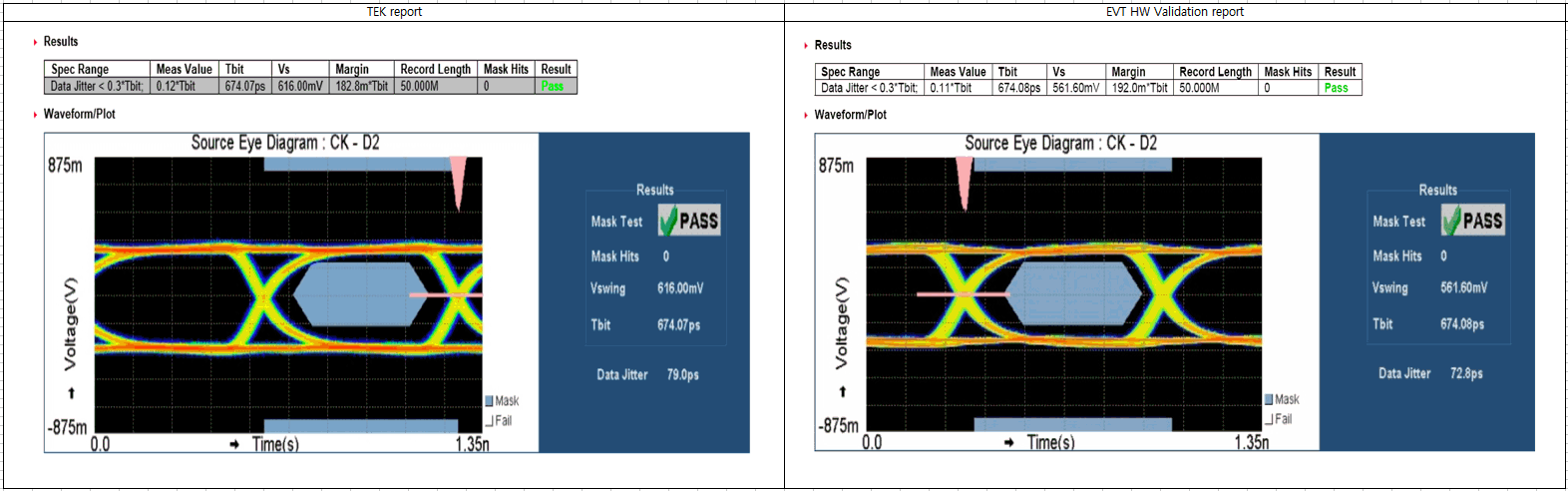
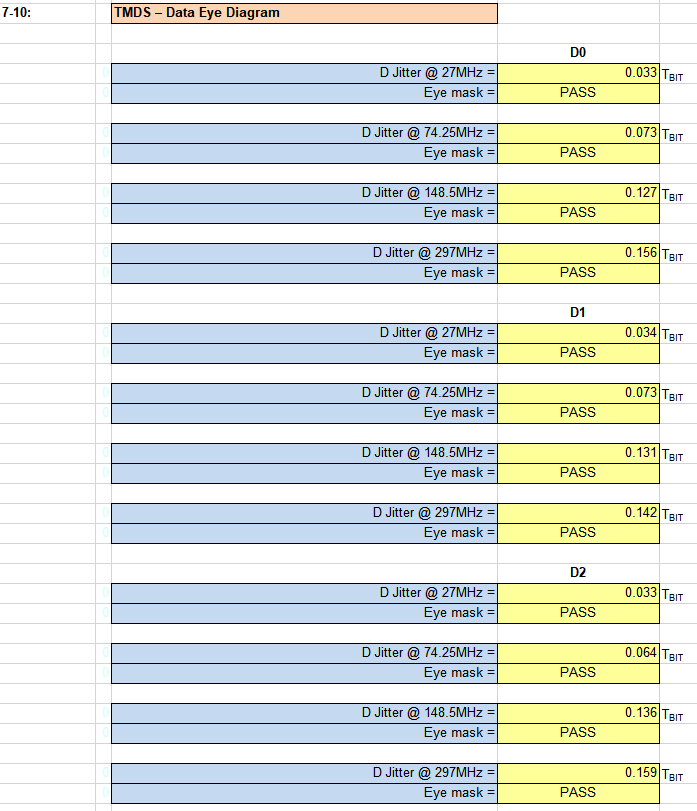
@ Sean, Jay thank you for supporting I have a question. the register of HDMI Swinglevel is not changed from beginning to now. (using defualt value from AML) But the swing level is different between TEK report and EVT HW validation HDMI report. I want to know why? in addition, there is no picture of HDMI eye diagram in DVT HW validation HDMI report (that is 3rd report. it just is written "Eye Mask = Pass") HDMISwinglevel_TEKvsEVT.gif (102,763 bytes) DVT HW validation HDMI report.gif (25,247 bytes) |
|
|
Hi SB, Here's the D2 Vswing under the Eagle+Cable condition with register value 4252. |
|
|
Hi Sean, Jay Thank you for your support @ Sean SKB manager request me to submit HDMI ATC Test report both Eagle and Cable. (not approval sheet but report with test data) please update at mantis |
|
|
Hi Henry, For the ATC test report of HDMI cable, please ask supplier to provide it. Thanks. |
|
|
Hi SB, Compliance test report for HDMI cable FYI |
|
|
Hi SB, Please find Eagle test report as attached. |
|
|
Hi Sean Thank you for updating document. I checked the TMDS_1.4 and TMDS_2.1. but I think this documents may not be conducted by Simplay lab. HDMI ATC was certified at 20Jun2019, the documets was conducted at Nov2019. If this documents are not HDMI ATC report, please update again to HDMI ATC report (include simplay lab mark) TMDS_DATE.gif (36,234 bytes) |
|
|
|
|
|
Hi SB, You are right. Simplay Lab. sent me the wrong report yesterday. Sorry about this. I attached again the correct one. Please check it and let me know if there is any further questions. Thanks. |
|
|
Hi Sean. SKB manager plan to HDMI CTS of Eagle by himself. He want to conduct HDMI CTS with the same state you conducted last year at simplay lab please let me know 1. test setup diagram 2. test sw (I think you conducted HDMI CTS with your own SW) 3. test stream I will setup and check with your condition first, then I'll communicate to SKB |
|
|
Hi Sean. SKB manager request again for HDMI CTS ---------------------------------------------------------------------------------------------------------------------------------------- SKB manager plan to HDMI CTS of Eagle by himself. He want to conduct HDMI CTS with the same state you conducted last year at simplay lab please let me know 1. test setup diagram 2. test sw (I think you conducted HDMI CTS with your own SW) 3. test stream I will setup and check with your condition first, then I'll communicate to SKB |
|
|
Hi SB, For HDMI CTS test, Simplay Lab. should follow the standard test procedure and setup defined by HDMI alliance. We will check with Lab. and reply you soon. Hi Jay, Please prepare the HDMI testing related information and reply to SB. |
|
|
Hi SB, Please find the attached environment setup of HDMI CTS, and it doesn't need to streaming the video since the Eagle HDMI could generate the waveform controlled by test software of oscilloscope. Besides, It can use current MP Image for HDMI CTS test, we don’t have specific version of Image for it. Could you let us know if this test will take place in 3rd party lab or somewhere else? |
|
|
Hi Sean, Jay Lin Thank you very much for your document. but I want to know the Eagle test setup. 1. please update the eagle test setup. (refer to the below picture and update the setup diagram) 2. sw version : according to symplay lab's report, the sw version is R13a. please update this sw version and upgrade method. SKB Manager want to conduct the same state of simplay lab. if you cannot provide this sw, please let me know the reason. SKB manager will conduct HDMI cts at 3 party lab in Korea. (this lab also can act on HDMI certification) example of test setup diagram.gif (28,744 bytes) |
|
|
Hi SB, That version was for eng build...and now we could not find the exact version used for testing. Thus we suggest SKB use MP image for HDMI CTS testing. |
|
|
Hi Henry Thank you for yor comment. and please update the test setup diagram. Then I'll have a meeting SKB manager with your documents. |
|
|
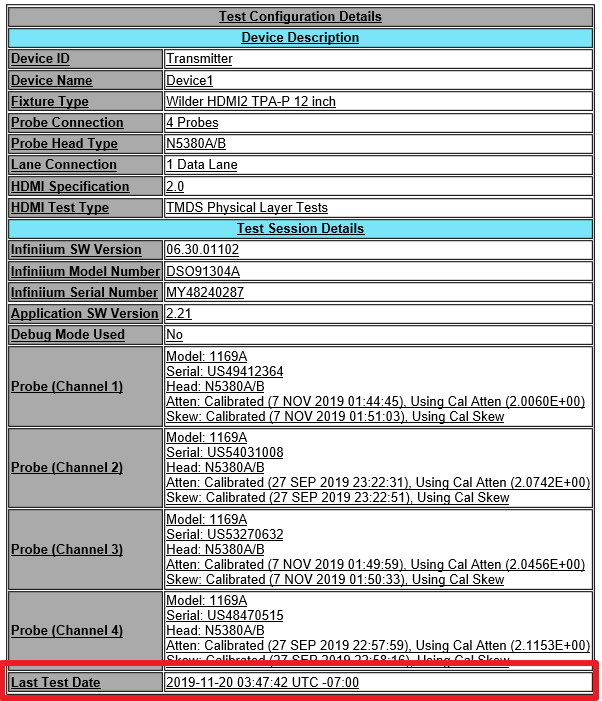
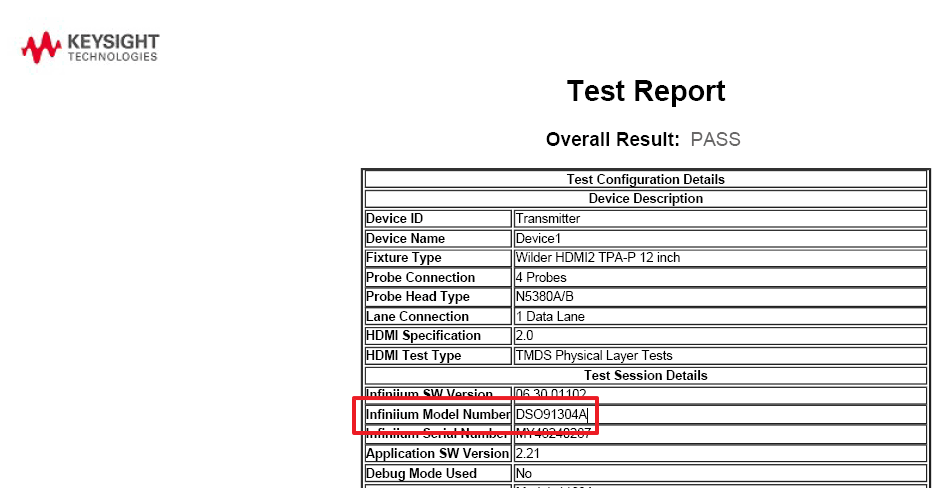
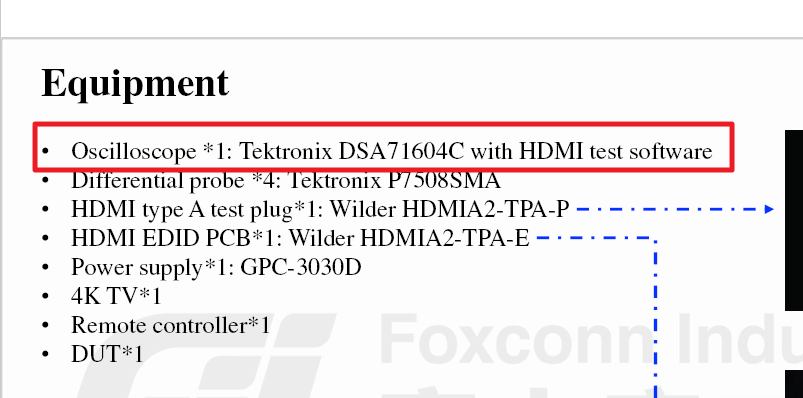
Hi Sean, Jay Lee I have a question According to your doc." HDMI CTS Environment setup.pdf", you mention that the scope is Tektronix DSA71604C But, according to doc. TMDS1.4 and TMDS2.1 which Sean shared at 03/24, the scope is Keysight DSO91304A please check which scope is right? SKB manager also check the test equipment. scope_keysight_tmds1.4.gif (22,357 bytes) scope_tek_jay_doc.gif (25,786 bytes) |
|
|
Hi SB, The Keysight report Sean had provided was tested by our 3rd party lab for HDMI certification, however, they can't provide the environment setup to us. Therefore, we asked Tektronix to provide related documents and the Oscilloscope is used in our SI Lab for HDMI pre-test as we mentioned in environment setup document. There are several brands of oscilloscope support HDMI CTS measurement, and the setup should be similar. For the setup of Eagle itself, it only needs a power adaptor to powering up the system during the test, but needs to connect to 4K TV to disable the ”Automatic Resolution Switching” and adjust the dedicate resolution prior to the test. |
|
|
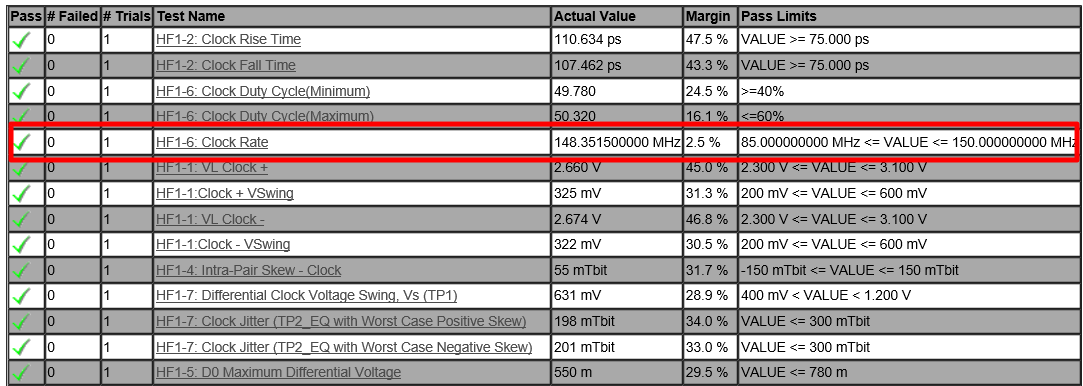
Hi Sean I have a question. according to Eagle_TMDS_2.1, HF1-6 Clock rate is 148.35MHz. Is it the pixel clock? If the pixel clock 148.5MHz, the resolution is 1080p/60hz or 2160p/30. please check and update your comment. TMDS2.1_Pixelclock.gif (43,399 bytes) |
|
|
Hi SB, The HF 1-6 test refers to TMDS clock, not completely equals to pixel colck in all of resolutions. For Example: 1080p60: TMDS clock=pixel clock=148.5MHz 2160p60: TMDS clock=148.5MHz, pixel clock=594MHz |
|
|
Hi Sean, Jay Lin 1. Please let me know the detail 4K spec. (for example. 2160p60Hz 8bit RGB 4;4;4, 2160P60Hz 10bit YUV 4:2:0) 2. could please update the capture of that 4K spec for evidance (I searched the doc. 861-F and vesa format, I cannot find the information TMDS clock of 4K) 3. And could you please update the application sheet which you submitted to simplay lab last year. (sorry I cannot find this doc. in my pc) |
|
|
Hi SB, Can you specify your questions as above? Do you want to know what HDMI 4K format supported by Eagle box or you just need the HDMI 4K spec.? |
|
|
Hi Sean. I first asked about HDMI clock rate of Eagle at 4K. because SKB manager and I 148.5MHz is 1080p's pixel clock. You and Jay Lin answered 148.5MHz is TMDS clock. I think TMDS clock can be in several cases these case are : YUV 420, YUV444, RGB444, RGB422 and so on. I don't know what exactly is the case for 148.5MHz. (for example, if the resolution 4k/60hz has horizental (3840+560), vertical (2160+90) and color depth 8bit, the TMDS clock is 594MHz. but If the number of processing per clock is incleasing, the TMDS clock is decreasing) Please let me know the exact case of 4k/60hz |
|
|
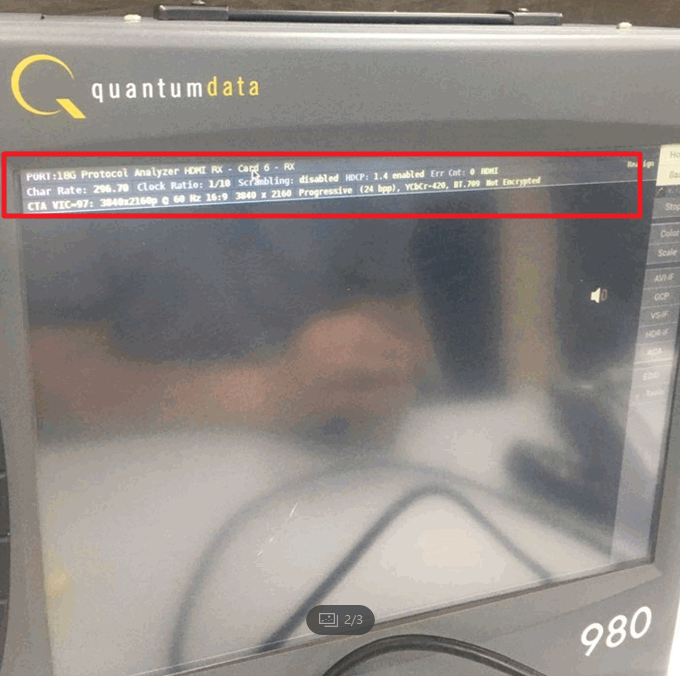
Hi Sean, Henry SKB manager conducted HDMI CTS at Korean 3rd party lab. But the test was failed. 1. 1080p/60Hz was passed 2. 2160p/60Hz was failed 1) DUT information - HW : DVT board, SW : 5.1.3.10 SD 2) Symptom - When the quantum equipment was setting 3840x2160@60Hz YCbCr 444(594MHz), but STB transferred to 3840x2160p@60Hz YCbCr : 420 deep color 8bit (296.7MHz) - At that time, if the HDMI cable pull out and in, the Eagle sometimes transferred wrong information (1080p/60hz or 2160p30hz 10bit) - Althout The tester changed the condition of HDCP (off and On) and stb resulution (auto and 4k), symptom is same - Other vender’s STBs are working well, so the test equipment is normal. 3. Requestment of SKB 1) Real 4k/60hz detail information of Eagle 2) The method of setting Eagle 3840x2160@60Hz YCbCr 444(594MHz) 3) The method of current resolution, YCbCr, deep color bit, clock information with console or adb command. |
|
|
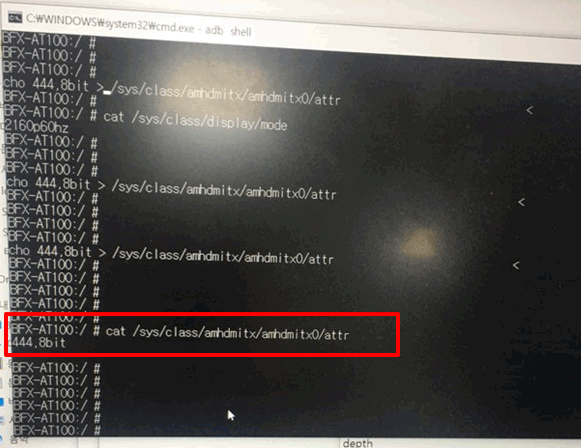
Hi Sean 1. The command which you guide works well at Korean 3rd lab. 2. Power off and on or HDMI Cable pull out and in, the setup turn into initial. Request of SKB manager 1. If the resolution and color depth is changed, do not change any more although power off/on or HDMI cable pull out/in 2. What is the max resolution and color depth value at HDMI Certification last year 3. Why HDMI output 2160p/60Hz and 420 8bit when Eagle connect to 4K TV - SKB manager checked the resolution and color depth with several 4K TVs at his office, the result is same (2160p/60hz, 420 8bit) - I also checked the resolution and color depth with 4K TVs in my office, the result is also same (2160p/60hz, 420 8bit) - SKB manager doubt Eagle only support 2160p/60hz 420 8bit. 4. Why HDMI output output 2160p/60Hz and 420 8bit when Eagle connect to Quantum Equipment (Quantum set up 2160p/60 444 8bit) 5. According to Jay Lin’s comment at mantis, the TMDS clock is 148.5MHz. why? - I calculated the TMDS clock. And the value is 594MHz |
|
|
Hi SB, We will check and reply you later soon. Hi Jay, Please follow up with this issue. Thanks. |
|
|
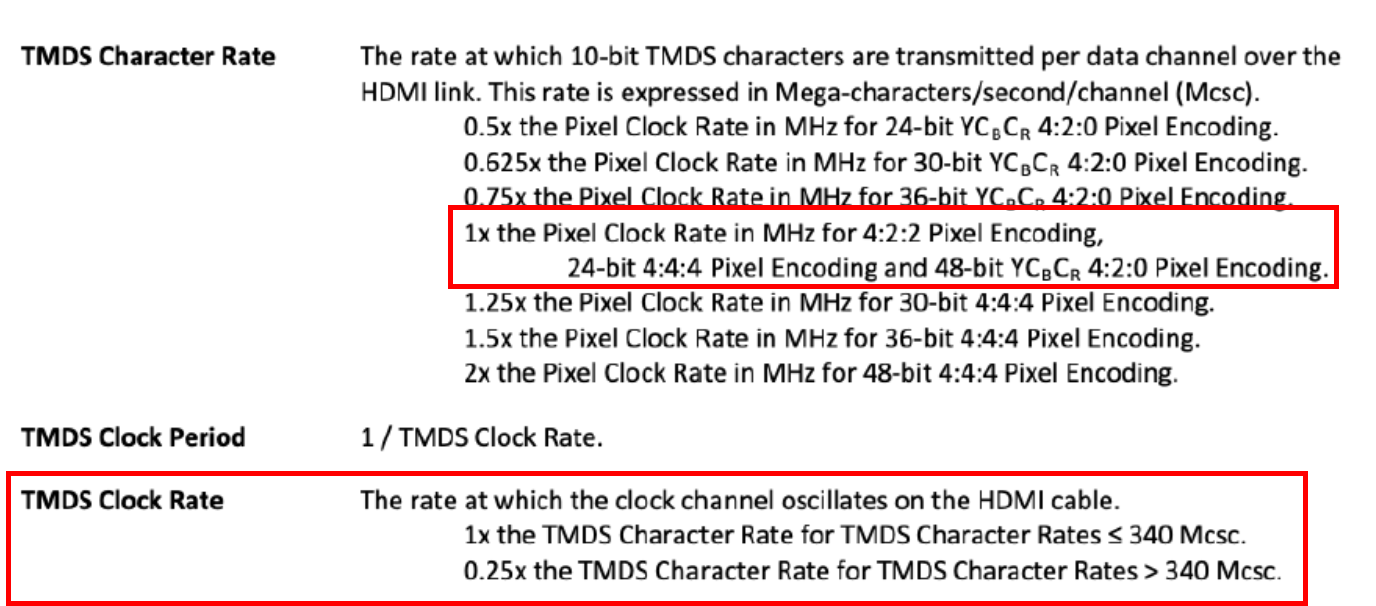
Hi SB, Please see reply as below. 1. Sorry to infrom you that we are not able to make this happen since these commannds are change the registers temparily, it will turns back if reboot or detect the hut plug event. 2. Please find the attached CDF form we applied for HDMI certification, we didn't specified the color depth for HDMI 2.0 but clarify that the TMDS Character Rate able to above 340Mcsc up to 600Mcsc. 3. We can see "420, 10bit" connect to one of the TVs in our office, the FW version is same as yours. 4. We are not sure about this since we also do the HDMI related tests by sending commands. 5. Please find the attached picture captured from HDMI 2.0 spec found in internet, which is indicates the calculation between pixel clock and TMDS clock rate. Further, just attached the user manual made by another Oscilloscope brand, it indicates the measurement of HF1-6 should be TMDS clock rate instead of pixel rate (p.30). |
|
|
Hi Sean, Jay Lin thank you for supporting but some of your replies are not enough. please update to more explanation 3. Why HDMI output 2160p/60Hz and 420 8bit when Eagle connect to 4K TV 4. Why HDMI output output 2160p/60Hz and 420 8bit when Eagle connect to Quantum Equipment (Quantum set up 2160p/60 444 8bit) |
|
|
Hi SB, 3. Why HDMI output 2160p/60Hz and 420 8bit when Eagle connect to 4K TV Could you help to get the EDID of this TV at same condition by the following command through Eagle? su cat /sys/class/amhdmitx/amhdmitx0/rawedid You could get the similar result as the follows if it's under correct operation 00ffffffffffff004dd901ba010101010113010380a05a780a0dc9a05747982712484c21080081800101010101010101010101010101023a801871382d40582c450040846300001e011d007251d01e206e28550040846300001e000000fc00534f4e592054562058560a2020000000fd00303e0e460f000a2020202020200185020330f0501f101405130412111615030207060120260907071507508301000068030c002000b82d0fe3050301e2007b023a80d072382d40102c458040846300001e011d00bc52d01e20b828554040846300001e011d8018711c1620582c250040846300009e011d80d0721c1620102c258040846300009e000000000000000e Suppose we can send this EDID to the TV and see if we can reproduce the symptom in our office. |
|
|
Hi Jay Lin I update the logs for three TVs' edid. tvedid_lg_log.txt (800 bytes) tvedid_lg2_log.txt (1,107 bytes) tvedid_samsung_log.txt (659 bytes) |
|
|
Hi Sean, Jay Lin I'm checking HDMI CTS test with SKB managers at 3rd party lab. It occurs very serious symptom. You updated how to change the color depth and resolution. and I rechecked that these commands are work well. But, today I and SKB manager insert the command into Eagle. and set up the resolution 2106p/60hz, color depth 444 8bit the log message is good. but the quantum equipment still display 420 8bit. please check this symptom. logmessage_444_8bit.gif (98,107 bytes) Quantum_420_8bit.gif (137,474 bytes) TEST SETUP.gif (5,238 bytes) |
|
|
Hi SB. It seems to me that the 420 8bit issue might caused by middleware. We've took 2 kinds of Eagle PCBA, and have different result between with or without middleware connecting to 4K TV shown below: 1. With middleware: It shows 420, 8bit 2. Without middleware, pure android TV: it shows 420, 10bit Further, we've checked the behavior of Amlogic FW, and it set the priority list for HDMI color depth: Basically, it will starting from 420, 12 bit->420, 10 bit-> 420, 8bit->444, 8bit based on the capability of TV. For the quantum issue, could you help to provide the opertion step by step? i.e. Plug in the quantum first then key in command or key in command then plug in the quantum. |
|
|
Hi Jay Lin please update your result asap. SKB manager strongly push ALT. Quantum edid check process 1. power on Eagle 2. connect HDMI cable 3. insert command for resolution and color depth 4. check the resolution and color depth through the log message 5. check the Quantum equipment. |
|
|
Hi SB, After checking with our SW Engineer, this issue might related to SW and Amlogic now is digging out the root cause of this. The middleware is using Amlogic API to adjust HDMI resolution, Amlogic is checking if there's any issue of adjusting resolution after implement middleware. |
|
|
Hi Sean SKB infra team checked Eagle bundle HDMI cable at HDMI CTS lab and the summaries of test result is that : HDMI 1.4 standard => all passed. : HDMI 2.0 standard => failed HF1-1 VL for D1 Fail & VSwing for D1 Fail D1+ : 3.24V, over spec D1- : 2.12V. under spec VSwing for D+ : 125.8051mV I attached test result and test station diagram. Action item. #1. In the same test environment, Do hdmi CTS test again, check Symptom. #2. If you checked the same symptoms, proceed to the root cause analysis. #3. If you can't same symptoms ,I'll send you the cable I tested in Korea @Sean I think this issue, HW team needs an analysis first. because the problem of this signal spec out is the related VoC of HDMI field defect. moreover SKB receives a lot of VoC (Video quality) from customers. I know that certified HDMI each single level. (STB and HDMI). but we have to also check the combination the problem of STB and HDMI cable Thanks SON |
|
|
updated HDMI cable test result |
|
|
Report already provided so close it. |
- yk.jung ( (ALTech) Younkwang Jung ) developer